Plugin creation triggers
ManiVault provides a standard mechanism for requesting plugin instances from the UI and from context-sensitive workflows (for example, “create a view for the selected dataset”). This mechanism is built around plugin triggers.
A plugin trigger is an action that, when executed, requests the creation of a plugin instance and optionally performs additional initialization (for example, loading a dataset into the created view).
This page explains what plugin triggers are, how they work, and how to implement them using the Scatterplot view plugin as inspiration.
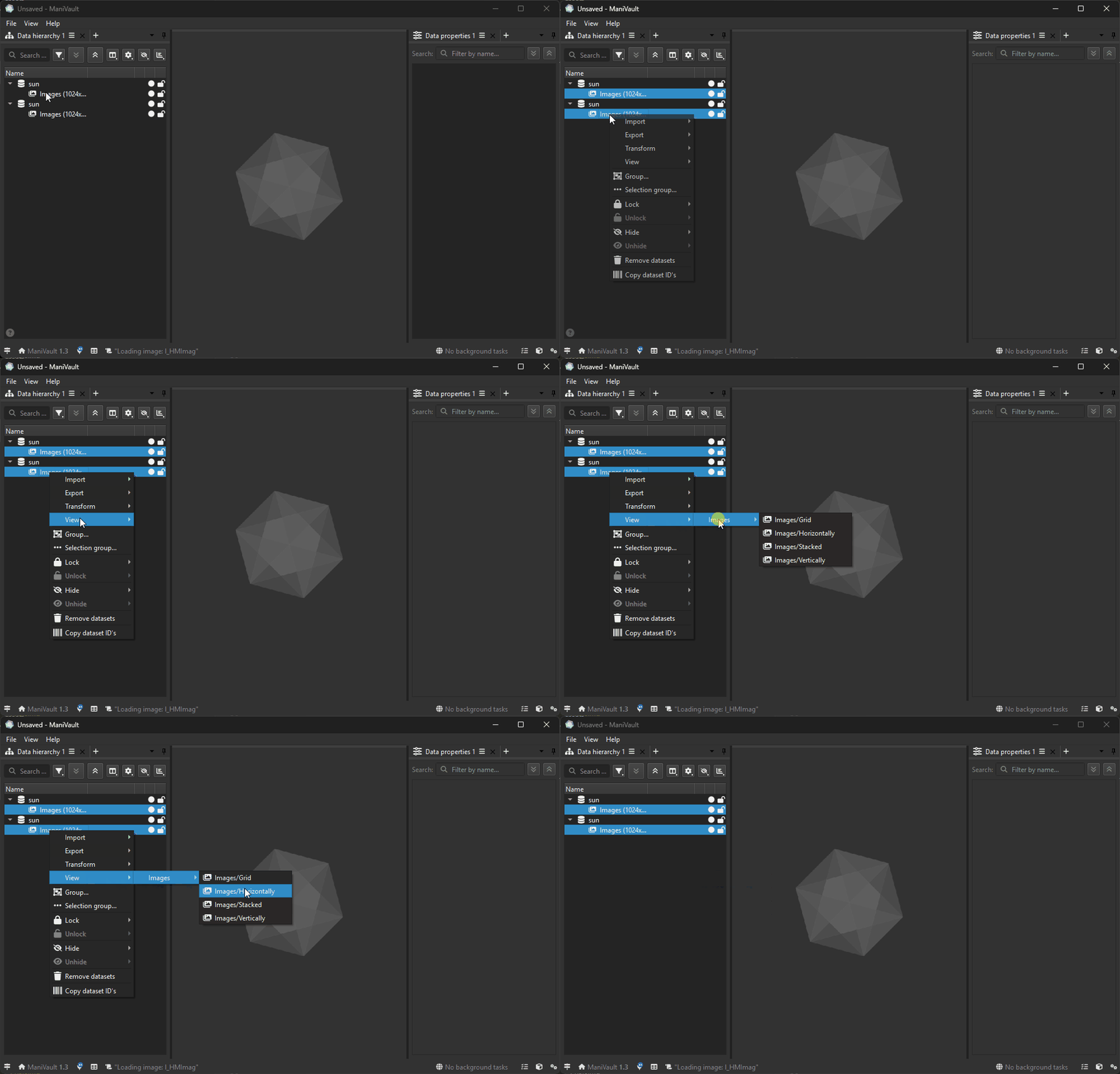
Plugin triggers in action; for a set of selected image datasets, the user has control over how these datasets are arranged in a single image view.
What is a plugin trigger?
A plugin trigger is represented by mv::gui::PluginTriggerAction, which is a specialized TriggerAction.
Conceptually, a plugin trigger:
Appears in the UI as an action (menu item, context menu entry, button, etc.)
Is associated with a plugin factory and a plugin kind
When triggered, requests the core to create an instance of that plugin
Can carry context such as input datasets
Can customize the creation process via a callback
By default, triggering a PluginTriggerAction requests the plugin from the plugin manager using the plugin kind.
Where do plugin triggers come from?
Plugin triggers are defined on the plugin factory (mv::plugin::PluginFactory) and are typically surfaced by the application in menus and context menus.
There are two common patterns:
A default trigger for the plugin
Every factory owns a defaultPluginTriggerActionthat can be used to create an instance of the plugin.Context-sensitive triggers
A factory can override methods that return trigger actions for specific datasets or data types.
Default trigger action
Plugin factories expose a default trigger via:
virtual mv::gui::PluginTriggerAction& getPluginTriggerAction();
The core initializes this default trigger during plugin factory construction and connects it to default creation behavior.
Dataset-based triggers
Factories can provide triggers specific to datasets:
virtual mv::gui::PluginTriggerActions getPluginTriggerActions(const mv::Datasets& datasets) const;
Typical usage:
The application calls this method when the user has selected datasets.
The returned triggers are shown in context menus such as “Create view for dataset …”.
When the user selects a trigger, the associated plugin instance is created and initialized.
How does a plugin trigger create a plugin?
mv::gui::PluginTriggerAction connects its triggered signal to requestPlugin() and invokes a request callback:
If a custom callback is set, that callback is invoked.
Otherwise, a default callback requests the plugin by kind from the plugin manager.
In simplified form:
Default behavior: “Create an instance of the plugin kind.”
Custom behavior: “Create an instance, then do additional setup.”
The customization point is:
void setRequestPluginCallback(RequestPluginCallback requestPluginCallback);
Example: Scatterplot-style trigger based on selected datasets
The Scatterplot view plugin illustrates the typical pattern:
Provide a trigger only when the selected datasets match what the view can consume (e.g., point datasets).
When triggered, create a Scatterplot view instance.
Load the selected datasets into the newly created view.
Step 1: implement dataset-based triggers in the factory
In your view plugin factory, override getPluginTriggerActions(const Datasets&) and return one or more triggers:
mv::gui::PluginTriggerActions ScatterplotPluginFactory::getPluginTriggerActions(
    const mv::Datasets& datasets
) const
{
    mv::gui::PluginTriggerActions triggers;

    // Only offer a trigger if the selected datasets are compatible.
    if (!PluginFactory::areAllDatasetsOfTheSameType(datasets, PointType) || datasets.isEmpty())
        return triggers;

    // Create a trigger action that will create a view instance and load the datasets.
    auto trigger = new mv::gui::PluginTriggerAction(
        nullptr,                 // parent (often assigned by the owner that stores the triggers)
        this,                    // plugin factory
        "Scatterplot",         // title shown in UI
        "Create a scatterplot for the selected dataset(s)",
        QIcon()                  // optional icon
    );

    // Attach context (optional but recommended if your callback needs it)
    trigger->setDatasets(datasets);

    // Customize creation: request the view and load datasets into it
    trigger->setRequestPluginCallback([this, datasets](mv::gui::PluginTriggerAction&) {
        auto* plugin = dynamic_cast<ScatterplotPlugin*>(
            mv::Application::core()->getPluginManager().requestViewPlugin(getKind())
        );

        if (!plugin)
            return;

        for (const auto& dataset : datasets)
            plugin->loadData(mv::Datasets({ dataset }));
    });

    triggers << trigger;
    return triggers;
}
Step 2: core/application surfaces the triggers
At runtime, the application (or a core UI layer) typically:
Collects triggers from relevant plugin factories
Initializes them (if needed)
Presents them in a context menu
The factory provides a helper to initialize trigger actions:
PluginFactory::initializePluginTriggerActions(triggers);
This ensures trigger actions are in a consistent state before being shown.
Practical guidance
Prefer dataset-based triggers for context menus and “create view for selection” workflows.
Keep trigger titles task-oriented (e.g., “Scatterplot”, “Histogram”, “Compute PCA”).
Use the request callback for post-creation initialization (loading datasets, setting defaults, wiring selections).
Avoid heavy work in the UI thread inside the callback; prefer task-based workflows for expensive operations.
Summary
A plugin trigger is an action (
PluginTriggerAction) that requests the creation of a plugin instance.Plugin factories can expose:
a default trigger (
getPluginTriggerAction()), andcontext-sensitive triggers (
getPluginTriggerActions(datasets)).
Triggers can be customized via a request callback to initialize the created plugin instance.
This enables consistent, discoverable plugin creation from menus and dataset-driven context menus.