What are actions used for in ManiVault studio?
In ManiVault Studio’s architecture, actions serve several important purposes:
Standardizing Plugin Interfaces
Actions provide a uniform look-and-feel and behavior across all plugins. Because all plugin settings (parameters, toggles, buttons) are built from the same set of action blocks, users get a consistent GUI experience. For instance, a slider looks and behaves the same everywhere. Plugin developers don’t need to design custom controls for common tasks – they leverage these ready-made components, leading to a cohesive interface design across the application.Capturing and Restoring State One core use of actions is to make plugin state serializable and easily saved. Each action knows how to serialize its current value and its UI state (whether it’s active, visible, editable, etc.) into a variant/JSON representation (see WidgetAction::toVariantMap(…)) and restore its state from JSON (see WidgetAction::fromVariantMap(…)).
All actions in a plugin form a hierarchical state tree that can be saved to disk (for example, as part of a project file or preset) and later reloaded to restore the plugin’s exact configuration. In practice, this means if you build your plugin UI with actions, you get save/load functionality for free – ManiVault can snapshot the entire actions hierarchy to JSON and reinstate it on demand. This is how ManiVault implements features like presets for plugin settings and even saving the complete application state (the Studio’s “Projects” feature uses action serialization to capture the UI and parameters of every plugin). For example, a developer might let users save a preset of an analysis plugin’s parameters; under the hood ManiVault just writes out the action values to a JSON file and can load them back later, no custom code needed.Parameter Linking and Communication Actions are also the mechanism for ManiVault’s interactive linking of parameters between plugins. If two plugins have actions of the same type (e.g. a DecimalAction controlling a certain parameter), ManiVault allows the user to connect them so that one shared value drives both plugins. The system’s messaging API uses actions as the endpoints for these connections. For example, the Mean-Shift clustering plugin and a Scatterplot view plugin might both have a “Sigma” parameter (one in an analysis context, one in a visualization context). In Studio mode, the Sigma action from one plugin is published and subscribed to from the other. From that point on, the two are linked – adjusting the value in one UI automatically updates the other and vice versa.
The underlined labels on actions indicate that an action can be published or subscribed (meaning it’s eligible for linking):

ManiVault italicizes the action’s label once connected:

Users can click an action’s label to get a menu for publishing it to a shared parameter pool or subscribing it to an existing shared parameter:
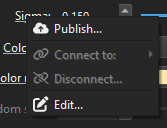
In summary, actions double as communication conduits: by using actions for plugin parameters, you automatically enable those parameters to be shared and synchronized across modules (a key design goal of ManiVault Studio).Exposing Data-Driven Actions
Beyond plugin settings, actions can represent operations attached to data objects. For instance, an analytics plugin might attach a TriggerAction to a data model (say, a “Refine clustering” button attached to a clustering result). Other plugins that deal with that data can detect the attached action and present a GUI control for it in context:
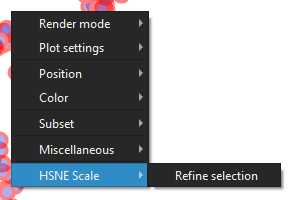
The scatterplot view plugin exposes actions from the HSNE analysis plugin
ManiVault’s core manages these links so that a view plugin can show, for example, a context menu item “Refine Clustering” if it finds that action on a dataset, even though the action’s logic lives in the analytics plugin. This is an advanced use, but it shows that actions are not limited to static plugin panels – they can also enable cross-plugin functionality by surfacing one plugin’s capabilities inside another’s interface. In short, actions help decouple functionality: any plugin can offer actions (parameters or triggers) that other plugins can discover and incorporate, fostering an extensible, interconnected system.
To summarize, ManiVault’s action blocks are used to build plugin UIs that are consistent, easily saved/loaded, and inherently shareable or linkable. They reduce the engineering effort for plugin developers (since common GUI and state-handling code is already done) and empower end-users with flexible workflows (linking parameters on the fly, saving presets, etc.).