Plugin-Wide Global Settings
Some plugins expose global settings that apply to the plugin as a whole, rather than to individual plugin instances. ManiVault provides a unified mechanism to define, register, display, and persist such settings in a consistent and discoverable way.
This page describes how plugin-wide global settings work, how they are registered, how they are stored, and how to persist plugin settings that are not exposed through the UI.
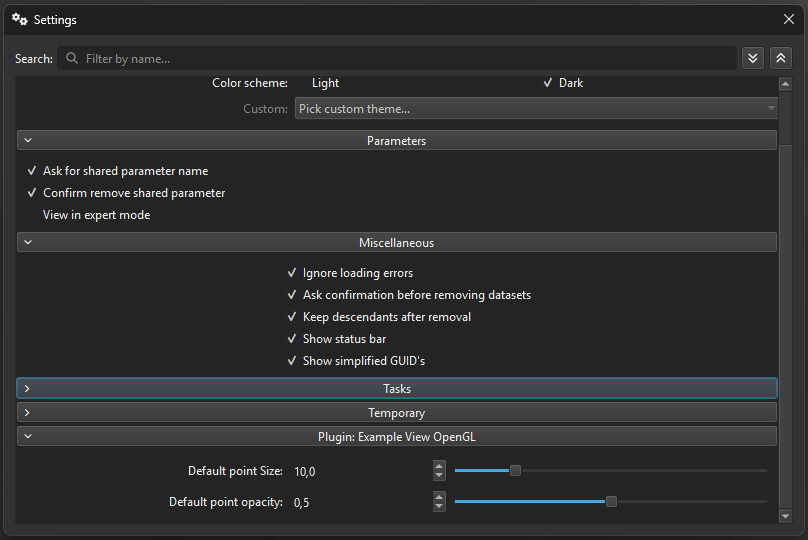
The Example View plugin exposes a global default point size and opacity that apply to all Example View instances.
What are plugin-wide global settings?
Plugin-wide global settings have the following characteristics:
Shared by all instances of a plugin
Independent of any specific project, view, or plugin instance
Persisted in the application’s settings store
Exposed automatically in ManiVault’s global settings UI (when a UI is provided)
Typical use cases include:
Default rendering or behavior options
Feature toggles
Thresholds or limits that apply to all instances
Plugin-wide preferences that should persist across application restarts
The API for plugin global settings is defined on mv::plugin::PluginFactory (or a derived factory).
Global settings group action
UI-exposed global settings are defined using a group action of type:
mv::gui::PluginGlobalSettingsGroupAction
This group action contains the individual actions (checkboxes, numeric fields, selectors, etc.) that make up the plugin’s global settings UI.
Querying the global settings group action
mv::gui::PluginGlobalSettingsGroupAction*
mv::plugin::PluginFactory::getGlobalSettingsGroupAction() const;
Returns a pointer to the plugin’s global settings group action, or nullptr if the plugin does not define global settings.
Registering the global settings group action
void mv::plugin::PluginFactory::setGlobalSettingsGroupAction(
    gui::PluginGlobalSettingsGroupAction* pluginGlobalSettingsGroupAction
);
When this function is called:
The group action is registered with the ManiVault core
Its contents automatically appear in ManiVault’s global settings UI
All contained actions are connected to the persistent settings store
Passing nullptr removes the plugin’s global settings from the global settings UI.
Note
Plugin developers do not need to manually insert the group action into any UI. Calling setGlobalSettingsGroupAction() is sufficient.
Settings storage and prefixes
Each plugin’s global settings are stored under a plugin-specific prefix in the settings store.
Global settings prefix
QString mv::plugin::PluginFactory::getGlobalSettingsPrefix() const final;
This function returns the prefix used to namespace the plugin’s global settings.
The prefix determines:
Where the settings are stored on disk
How settings are isolated between plugins
How naming conflicts are avoided
All actions contained in the global settings group automatically store and retrieve their values under this prefix.
Note
The global settings prefix should be treated as stable API. Changing it will cause previously stored user settings to be ignored or lost.
Typical setup pattern
Global settings are typically created and registered during plugin or factory initialization.
auto globalSettings = new gui::PluginGlobalSettingsGroupAction(
    this,
    "My Plugin Settings"
);

// Add actions to the group
globalSettings->addAction(new gui::BoolAction(this, "Enable feature"));
globalSettings->addAction(new gui::DecimalAction(this, "Global threshold"));

// Register the group action
setGlobalSettingsGroupAction(globalSettings);
Once registered:
The settings appear automatically in ManiVault’s global settings UI
Stored values are restored at application startup
Changes are persisted automatically by the core
UI-less persistent plugin settings
Not all plugin settings need to be exposed in the global settings UI. For internal, advanced, or programmatic configuration, plugins can store persistent settings without UI using the plugin base class.
The preferred API is:
hdps::Plugin::setSetting(const QString& path, const QVariant& value);
hdps::Plugin::getSetting(const QString& path,
                          const QVariant& defaultValue = QVariant());
The path parameter defines the logical location of the setting. Setting groups are created using forward slashes (/).
Saving a setting
plugin->setSetting("General/Computation/NumberOfIterations", 32);
Loading a setting
const auto numberOfIterations =
    plugin->getSetting("General/Computation/NumberOfIterations", 32).toInt();
These settings:
Are persisted in the same settings store
Are namespaced to the plugin
Do not require any UI components
Are suitable for internal state, expert options, or algorithm parameters
Design guidelines
When defining plugin-wide global settings:
Use global settings sparingly; prefer instance-level settings where appropriate
Do not store project-specific or view-specific state globally
Choose clear, stable names for settings and groups
Group related settings logically
Assume settings may be modified while plugin instances are active
Lifecycle considerations
Global settings typically live for the lifetime of the plugin factory
The core handles persistence and UI integration
Plugins own the actions and semantics of the settings
Removing or renaming settings keys may invalidate existing user preferences
Summary
Plugin-wide global settings are exposed via
PluginGlobalSettingsGroupActionRegistering the group action automatically integrates it into ManiVault’s global settings UI
Settings are namespaced using a stable plugin-specific prefix
Persistence and restoration are handled by the core
UI-less persistent settings can be stored directly via the plugin base class
This approach allows plugins to expose consistent, discoverable, and persistent global configuration without custom UI or storage logic.