Status bar integration
Some plugins expose information or controls that are best presented in the application status bar. ManiVault provides PluginStatusBarAction as a convenience class for integrating plugin-specific status bar actions that automatically react to plugin lifecycle events.
This page explains what a plugin status bar action is, how it behaves, and how it is registered via the plugin factory.
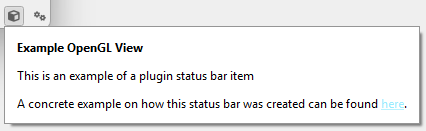
The example view GL plugin demonstrates the concept of a plugin-specific status bar.
What is a plugin status bar action?
A plugin status bar action is a UI action that appears in the application’s status bar and is associated with a specific plugin kind.
Typical use cases include:
Displaying plugin-specific state or indicators
Providing quick access to plugin-related controls
Showing runtime information relevant to the plugin
Status bar actions are:
Global to the application
Associated with a plugin kind, not a specific plugin instance
Optionally shown only when the plugin is instantiated
Conditional visibility
PluginStatusBarAction supports conditional visibility, allowing the action to be shown only when at least one instance of the corresponding plugin exists.
By default:
The action is visible only if one or more plugin instances are loaded.
This avoids cluttering the status bar with actions that are not relevant until a plugin is actually in use.
The visibility condition is reevaluated automatically.
Lifecycle integration
The status bar action integrates with the plugin manager and reacts to plugin lifecycle events:
When a plugin instance of the associated kind is created
When a plugin instance of the associated kind is destroyed
On each relevant event, the action reevaluates its visibility. No manual bookkeeping is required by the plugin or application.
Constructor
PluginStatusBarAction(
    QObject* parent,
    const QString& title,
    const QString& pluginKind = ""
);
Parameters:
title– The label shown in the status bar.pluginKind– The plugin kind this action is associated with.
This value is used to resolve the plugin factory, track instance creation, and derive the plugin icon.
If the plugin factory is already loaded, the action automatically adopts the plugin’s icon.
Visibility logic (conceptual)
If conditional visibility is enabled:
The action is visible only when
getNumberOfInstances() >= 1
If conditional visibility is disabled:
The action is always visible
This logic is reevaluated when plugin instances are added or removed.
Registering a status bar action
Status bar actions are registered through the plugin factory.
Plugin factory API
gui::PluginStatusBarAction* getStatusBarAction() const;
void setStatusBarAction(gui::PluginStatusBarAction* statusBarAction);
Typical setup
Status bar actions are usually created and registered during plugin factory initialization.
auto statusBarAction = new gui::PluginStatusBarAction(
    this,
    "My Plugin Status",
    getKind()
);

setStatusBarAction(statusBarAction);
Once registered:
The action appears in the application’s status bar
Visibility is managed automatically
The application does not need to handle plugin lifecycle events manually
Passing nullptr to setStatusBarAction() removes the plugin’s status bar action.
Design guidelines
When adding a plugin status bar action:
Keep content lightweight and non-intrusive
Avoid duplicating full UI panels or dialogs
Prefer short labels, indicators, or quick toggles
Use conditional visibility to reduce clutter
Assume the action may appear and disappear during runtime
Summary
PluginStatusBarActionprovides a standardized way to integrate plugin-related UI into the status barActions can automatically appear only when plugin instances exist
Visibility reacts to plugin lifecycle events without manual wiring
Registration is handled through the plugin factory
This keeps status bar integration consistent, minimal, and maintainable